
Google AI Mode vs ChatGPT Search: Which AI Search Tool Should You Use in 2026?
Search is no longer limited to typing a few keywords and opening ten blue links.
Google AI Mode and ChatGPT Search both let you ask complete questions, receive summarized answers, explore sources and continue with follow-up questions. But they do not approach search in exactly the same way.
Google AI Mode is built directly into Google Search. It is designed to explore the web, divide complicated questions into smaller searches and connect users with relevant pages.
ChatGPT Search is built around a conversation. It searches the web when current information is needed, explains what it finds and helps you transform that information into a plan, comparison, email, report or decision.
Google reported in May 2026 that AI Mode had passed one billion monthly users globally. It also said the average AI Mode query was approximately three times longer than a traditional Google query, suggesting that people are increasingly searching with complete questions instead of short keyword phrases.
So which one should you use?
The answer depends less on which company has the “best AI” and more on what you are trying to accomplish.
Quick answer: Use Google AI Mode when you want to discover websites, explore a topic visually or search for local, shopping and web-based information. Use ChatGPT Search when you want to discuss the findings, compare options, maintain context and turn research into a useful output.
Table of contents
Google AI Mode vs ChatGPT Search at a Glance
| Category | Google AI Mode | ChatGPT Search |
|---|---|---|
| Main experience | AI-powered Google Search | Conversational assistant with web access |
| Best for | Discovering and exploring web information | Understanding, organizing and applying information |
| Question style | Detailed searches and complex comparisons | Natural questions and ongoing conversations |
| Follow-up questions | Supported | Supported with full conversation context |
| Sources | Links throughout AI responses | Inline citations and a Sources panel |
| Visual search | Strong image and camera-based search | Can include images in search results; broader image capabilities depend on the ChatGPT experience |
| Local search | Closely connected to Google’s search ecosystem | Uses general or optional precise location for relevant results |
| Writing assistance | Useful for gathering information | Strong for transforming research into drafts and structured outputs |
| Shopping and places | Strong product, business and local discovery | Useful for recommendations and some reservation-related searches |
| Intensive research | Good for exploring subtopics across Search | Better handled through ChatGPT’s separate Deep Research feature |
| Main weakness | Responses may feel less flexible after the search stage | The summary can make it tempting to skip reading original sources |
This table reflects the way each product is designed and documented. Individual results can vary by question, location, language, account and feature availability.
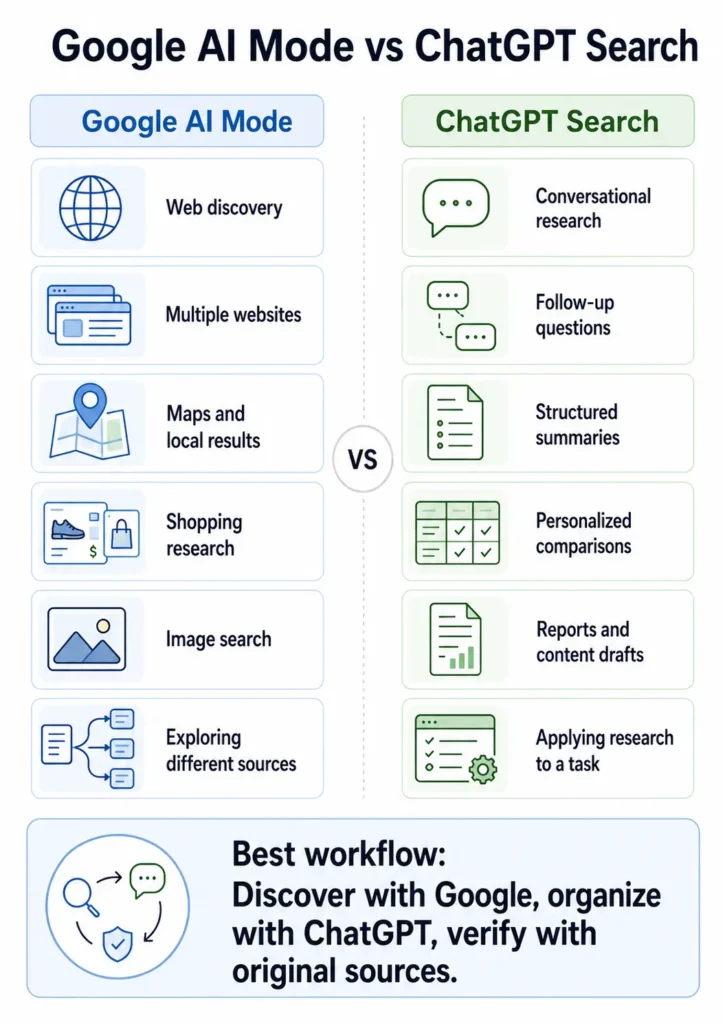
Discover with Google. Organize with ChatGPT. Verify with original sources.
What Is Google AI Mode?
Google AI Mode is a conversational search experience inside Google Search.
Instead of returning only a traditional list of results, AI Mode attempts to understand a complicated question and produce an organized answer with links that let you explore the topic further.
According to Google, AI Mode is particularly useful for questions that require:
- Further exploration
- Reasoning
- Complicated comparisons
- Multiple related searches
- Follow-up questions
- Information from different types of sources
One of its most important technologies is called query fan-out.
When you ask a complicated question, Google may divide it into several related searches. It can search those subtopics simultaneously, retrieve relevant pages and use the information to construct a more complete response.
For example, imagine asking:
I need a lightweight laptop for travel, writing and basic photo editing. My budget is $1,000, battery life matters more than gaming performance, and I prefer a 14-inch screen. What should I compare?
Instead of treating this as one keyword, AI Mode may explore:
- Lightweight laptops under $1,000
- Battery-life tests
- Laptop weight and dimensions
- Displays suitable for photo editing
- Current prices
- Professional reviews
- Manufacturer specifications
It then brings those strands together into one response.
How You Can Ask Questions in AI Mode
Depending on availability and device, AI Mode can accept questions through:
- Text
- Voice
- Images
- A phone camera
- Follow-up questions
Google also continues to add more multimodal and interactive search features. Some newer capabilities may depend on your country, language, device or account.
What Makes AI Mode Different from Traditional Google Search?
Traditional Google Search expects you to review pages and build the answer yourself.
AI Mode tries to perform part of that initial organization for you.
Instead of searching separately for:
- Best beginner camera
- Beginner camera under $800
- Mirrorless vs DSLR
- Cheap camera lenses
- Camera battery comparison
You can describe the entire situation in one detailed question.
That does not mean you should stop opening websites. The generated response is best treated as a starting point that helps you decide which sources deserve closer examination.
What Is ChatGPT Search?
ChatGPT Search adds current web information to a ChatGPT conversation.
ChatGPT can automatically decide to search when your question requires recent information. You can also select Search manually when you want an answer grounded in current web sources.
OpenAI states that ChatGPT Search is available across its main ChatGPT plans and can be used on the web, desktop and mobile applications. Search responses may contain inline citations, while the Sources panel displays cited pages and other relevant links.
ChatGPT Search may also rewrite your question into several targeted search queries.
For example, you might ask:
What are the most important developments in home solar batteries this year, and what do they mean for an average homeowner?
ChatGPT might search separately for:
- Recent home battery announcements
- Battery price changes
- Government incentives
- Installation costs
- Storage capacity
- Independent performance reviews
The important difference is what happens after the search.
Because the search takes place inside a conversation, you can continue with requests such as:
Explain that more simply.
Compare only the two options suitable for an apartment.
Turn the findings into questions I should ask an installer.
Create a one-page summary for my partner.
This conversational transformation is where ChatGPT Search is often most useful.
For better results, learn how to provide context, constraints and a clear output format in our complete guide to prompt engineering.
Google AI Mode vs AI Overviews: What Is the Difference?
Google AI Mode and AI Overviews are related, but they are not the same experience.
AI Overviews
An AI Overview is a generated summary that may appear above or among regular Google results.
It is intended to give you a quick understanding of a question while preserving the standard search results page underneath it.
Google decides when an AI Overview may add value. It does not appear for every search.
AI Mode
AI Mode is a dedicated conversational search experience.
It is more suitable when you want to:
- Ask a long and detailed question
- Explore several aspects of a topic
- Compare multiple options
- Ask follow-up questions
- Change direction without starting again
- Continue a previous search
A simple way to remember the distinction is:
AI Overview summarizes one search. AI Mode helps you explore a topic through a conversation.
Google says the two features may use different models and techniques, which means they can display different answers and supporting links for the same general topic.
10 Practical Research Scenarios: Which Tool Should You Use?
The following scenarios are not laboratory benchmarks. They are practical examples showing how the design of each tool affects everyday research.
1. Finding a Quick Current Answer
Example question:
What changed in the latest version of Android, and which supported phones receive the update first?
Best choice: Either tool
Both Google AI Mode and ChatGPT Search can retrieve current information and link to web sources.
Google AI Mode may be more convenient when you want to move quickly between official announcements, news reports and device-support pages.
ChatGPT Search may be more convenient when you want the changes categorized and explained for a particular type of user.
ChatGPT Search prompt:
Search the web for the latest stable Android update.
Use official Android and phone-manufacturer sources whenever possible.
Explain:
1. The five most important changes
2. Which phones receive it first
3. Which features may be limited by device
4. What an average user should do before updating
Include the publication date of each important source.
2. Discovering Different Sources and Viewpoints
Example question:
What are the strongest arguments for and against four-day workweeks?
Best choice: Google AI Mode
AI Mode is particularly useful when the goal is to explore a topic and discover a range of reports, studies, expert opinions and firsthand experiences.
Google has also expanded how AI responses display inline links, in-depth articles and previews from online discussions, making it easier to move from the summary to the wider web.
Google AI Mode prompt:
Help me research the four-day workweek.
Organize the answer into:
– Evidence supporting it
– Evidence against it
– Industries where it works well
– Industries where it is difficult
– Employee experiences
– Employer concerns
Prioritize recent studies, original reports and firsthand case studies.
Show sources representing different viewpoints.
3. Turning Research into a Structured Brief
Example task:
Research a topic and turn it into a presentation outline.
Best choice: ChatGPT Search
Google AI Mode can help you locate the information, but ChatGPT is especially useful when the final goal is not just finding facts.
It can transform the findings into:
- A report
- Presentation outline
- Comparison table
- Checklist
- Content brief
- Decision framework
Prompt:
Search for current information about how small businesses are using generative AI.

Prioritize original surveys and reputable business reports.

Then turn the findings into a 10-slide presentation outline.

For each slide, provide:
- Slide title
- Main message
- Two supporting facts
- Recommended visual
- Source links

Clearly separate verified facts from your interpretation.
4. Researching Local Businesses and Places
Example question:
Find a quiet café near me with reliable Wi-Fi, accessible power outlets and strong recent reviews.
Best choice: Google AI Mode, with a slight advantage
Google’s deep connection to Search, Maps, business listings and local information can make AI Mode especially useful for discovering places.
ChatGPT Search can also provide local results. OpenAI says it may use general location based on your IP address, while optional precise location can improve nearby results.
Whichever tool you use, verify:
- Opening hours
- Exact location
- Recent reviews
- Reservation requirements
- Accessibility information
- Prices
Local information changes frequently.
5. Searching with an Image
Example task:
Identify an unfamiliar plant, object, landmark or product from a photo.
Best choice: Google AI Mode
Google’s multimodal search experience is designed around text, voice, images and visual context.
You can upload or capture an image, ask what it contains and continue with more specific questions.
Example prompt:
Identify the object in this image.

Then explain:
- What it is normally used for
- The visible features that support the identification
- Similar objects it could be confused with
- What additional photo angle would improve confidence
- Reliable websites where I can verify the answer
For safety-critical subjects such as plants, medication, electrical components or damaged equipment, never rely on image identification alone.
6. Comparing Products Before a Purchase
Example question:
Which noise-cancelling headphones are best for flights, calls and long working sessions?
Best choice: Use both
Start with Google AI Mode to discover:
- Current models
- Manufacturer specifications
- Retail prices
- Independent measurements
- Professional reviews
- Owner experiences
Then use ChatGPT Search to organize those findings around your personal priorities.
ChatGPT follow-up prompt:
Using the sources we found, compare these headphones for my specific needs:
– Frequent flights
– Two hours of video calls per day
– Comfort with glasses
– Strong microphone quality
– Replaceable ear cushions
– Maximum budget of $350
Create a weighted decision table.
Do not choose a winner until you show:
1. The criteria
2. The weight assigned to each criterion
3. The evidence behind every score
4. Any missing or conflicting information
This approach turns AI into a thinking partner rather than an automatic decision-maker. See our guide to using AI as a thinking partner for more examples.
7. Planning a Project or Trip
Example task:
Research a trip and build a realistic itinerary.
Best choice: ChatGPT Search, with verification through Google
ChatGPT’s conversational memory is useful when a plan contains many constraints.
You can provide:
- Budget
- Travel dates
- Interests
- Dietary requirements
- Preferred pace
- Transport limits
- People travelling
- Activities to avoid
ChatGPT can then maintain those requirements throughout the conversation.
However, use Google or the original provider to confirm:
- Flight times
- Hotel availability
- Entry requirements
- Prices
- Opening hours
- Local transport
- Weather-sensitive activities
Prompt:
Search for current information and create a four-day itinerary for Lisbon.
Travellers:
– Two adults
– First visit
– Moderate budget
– No rental car
– Interested in food, history and photography
– Prefer no more than three major activities per day
For every recommendation, include:
– Neighborhood
– Estimated travel time
– Why it fits our preferences
– Booking requirement
– Official source where available
Flag all information that should be reconfirmed before the trip.
8. Following Breaking News
Example question:
What happened today, and what has been confirmed?
Best choice: Either tool, but source verification matters more than the interface
AI-generated news summaries can mix:
- Confirmed facts
- Early reports
- Commentary
- Predictions
- Old background information
- Social media claims
Ask the tool to separate these categories.
Prompt:
Search for the latest reliable reporting about this event.
Create four sections:
1. Confirmed facts
2. Claims that are not independently verified
3. Relevant background
4. What we still do not know
Use primary sources and established news organizations.
Include publication times and note when multiple reports appear to rely on the same original source.
Never judge reliability by the number of links alone. Five articles can repeat one unverified claim.
9. Conducting Academic or Professional Research
Example task:
Review a complicated topic across many studies, documents and datasets.
Best choice: ChatGPT Deep Research rather than ordinary ChatGPT Search
ChatGPT Search is designed for relatively fast, current answers.
OpenAI’s separate Deep Research feature is intended for multi-step investigations that require searching, analyzing and synthesizing many sources into a documented report. It can also work with uploaded files and, in supported workflows, restrict searches to trusted sources.
Google AI Mode can still be valuable for discovering:
- Official reports
- Technical documentation
- Research institutions
- Experts
- Alternative terminology
- Relevant subtopics
For serious research, use AI to assist the process—not replace your evaluation of the evidence.
10. Turning Information into Useful Content
You can also explore these AI prompts for productivity to turn research into practical daily workflows.
Example task:
Research a subject and create a reader-friendly article.
Best choice: ChatGPT Search
ChatGPT can move directly from research to:
- Creating an outline
- Identifying reader questions
- Simplifying technical ideas
- Drafting examples
- Producing comparison tables
- Revising tone
- Improving structure
But there is an important danger: a polished article can still be generic or inaccurate.
Google advises publishers not to simply recycle information that already exists or create commodity content that could be generated by almost anyone. Original experience, unique analysis and useful evidence are more valuable than another summary of common facts.
Use this research prompt before drafting:
Research the topic using recent, reliable sources.
Before writing the article:
1. List the facts that are strongly supported
2. Identify areas where sources disagree
3. Find unanswered reader questions
4. Suggest opportunities for original examples or testing
5. Separate source-based facts from proposed interpretations
Do not draft the article until the evidence map is complete.
For more advanced instructions, explore our collection of advanced ChatGPT prompts.
Which Tool Gives More Accurate Answers?
Neither tool is always more accurate.
Accuracy can depend on:
- The wording of your question
- The sources retrieved
- How recent the information is
- Whether the subject is controversial
- Whether reliable sources exist
- The model used at that moment
- Your country and language
- Whether you ask for evidence
- Whether you challenge the first answer
Google explicitly warns that AI Mode is experimental and may make mistakes. ChatGPT Search provides citations, but citations do not automatically guarantee that every claim is accurately supported by the cited page.
A generated answer can fail in several ways:
It Can Misinterpret a Source
The source may be reliable while the AI’s interpretation is wrong.
It Can Use an Outdated Page
A page can rank well but contain older information.
It Can Combine Incompatible Facts
Two accurate facts from different contexts may produce a misleading conclusion when combined.
It Can Hide Uncertainty
A fluent answer may sound more certain than the evidence justifies.
It Can Cite a Source That Does Not Fully Support the Claim
Always open the most important citations and locate the supporting evidence yourself.
Read our explanation of AI hallucinations and how to reduce them before relying on AI-generated research for important decisions.
A Five-Step Method for Verifying AI Search Answers
Use this process with either tool.
Step 1: Ask for Primary Sources
Request official documents, original research, company announcements, government pages or direct datasets.
Prioritize primary sources. Use secondary articles only when they add analysis or context.
Step 2: Check the Date
Verify both:
- The publication date
- The date when the described event happened
A newly published article can summarize old information.
Step 3: Open the Citation
Do not assume the source supports the sentence beside it.
Read the relevant section of the page.
Step 4: Search for Disagreement
Ask:
Find reliable sources that disagree with this conclusion or interpret the evidence differently.
This reduces the risk of accepting the first available narrative.
Step 5: State What Remains Unknown
Ask the tool to separate:
- Known facts
- Reasonable interpretations
- Estimates
- Predictions
- Missing information
This simple distinction improves almost every research answer.
How to Use Google AI Mode More Effectively
AI Mode works best when you stop writing short keyword strings and start describing your real situation.
Instead of: best project management tool
Try:
Compare project management tools for a remote team of eight people.
We need:
– Simple task management
– Client access
– Recurring tasks
– Time tracking
– Google Drive integration
– A total budget below $100 per month
Compare current pricing, limitations and the learning curve.
Use official product pages and recent independent reviews.
A Strong Google AI Mode Prompt Formula
Use this structure:
I need to [goal].
My situation:
[context]
Important requirements:
[constraints]
Research:
[sources, dates or evidence required]
Present the answer as:
[format]
Example
I need to choose an email marketing platform for a small online course business.My situation: – 2,500 subscribers – One weekly newsletter – Two automated email sequences – Selling through Gumroad – No technical employeeImportant requirements: – Easy automation – Clear pricing – Good deliverability – Simple landing pages – GDPR-friendly toolsResearch current information from official pricing and feature pages.Present the answer as a comparison table followed by the three strongest options and the
Example
I need to choose an email marketing platform for a small online course business.
My situation:
– 2,500 subscribers
– One weekly newsletter
– Two automated email sequences
– Selling through Gumroad
– No technical employee
Important requirements:
– Easy automation
– Clear pricing
– Good deliverability
– Simple landing pages
– GDPR-friendly tools
Research current information from official pricing and feature pages.
Present the answer as a comparison table followed by the three strongest options and the trade-offs of each.
How to Use ChatGPT Search More Effectively
ChatGPT Search becomes more useful when you tell it what to do with the information after finding it.
A weak request is: Search for email marketing tools.
A stronger request is:
Search for email marketing tools suitable for a solo creator with 2,500 subscribers.
Use current official pricing pages and recent independent reviews.
First, build an evidence table.
Then ask me three questions about my priorities.
Do not recommend a tool until I answer.
This creates a better workflow:
- Search
- Organize evidence
- Clarify preferences
- Compare options
- Make a conditional recommendation
A Strong ChatGPT Search Prompt Formula
Search for [information].Prioritize: [source requirements]Compare: [criteria]Account for: [personal context and constraints]Before concluding: [verification or clarification step]Deliver: [final format]
Good prompting does not mean using complicated language. It means giving the AI enough context to understand what a useful answer looks like.
The Best Research Workflow: Use Both Tools
You do not have to choose one tool permanently.
For many important questions, the strongest workflow is:
1. Use Google AI Mode to Explore
Discover:
- Relevant websites
- Alternative terminology
- Recent developments
- Product pages
- Expert perspectives
- Subtopics you had not considered
2. Open the Best Sources
Read the original pages instead of relying only on the generated summary.
3. Use ChatGPT Search to Organize
Ask ChatGPT to:
- Compare the evidence
- Identify contradictions
- Create a decision table
- Explain technical ideas
- Build a plan
- Generate follow-up questions
4. Verify Important Claims
Return to primary sources.
5. Make the Final Decision Yourself
AI can organize information, but your priorities determine what the information means.
The best AI search workflow is not “ask once and trust.” It is search, inspect, question, compare and verify.
What AI Search Means for Website Owners and Content Creators
Google AI Mode and ChatGPT Search are also changing how people discover websites.
A page may now be found because an AI system selected it as a supporting source for a detailed question—not only because it ranked for one exact keyword.
For Google AI Mode and AI Overviews, Google says there are no special AI schema requirements or secret optimization files. The same foundations still matter:
- Crawlable pages
- Clear internal links
- Helpful textual content
- Good page experience
- Relevant images and videos
- Accurate structured data
- Original, people-first information
Google also states that websites do not need special AI markup or an llms.txt file to appear in its generative search features.
For ChatGPT Search, OpenAI recommends allowing its search crawler to access your website if you want your content to be eligible for discovery.
The practical lesson is simple:
Do not create dozens of thin pages targeting every possible AI search phrase.
Create resources that contain something worth citing:
- Original tests
- Clear definitions
- Detailed tutorials
- Firsthand experience
- Useful tables
- Transparent methodology
- Expert explanations
- Updated evidence
- Specific examples
That is more sustainable than attempting to manipulate an AI answer.
Is Google AI Mode the Same as Gemini?
No. Gemini is Google’s broader AI model and assistant ecosystem. AI Mode is a search experience inside Google Search that uses Gemini-based capabilities alongside Google’s search systems and web index.
Is Google AI Mode the Same as an AI Overview?
No. An AI Overview is a generated summary that may appear in traditional Google results. AI Mode is a dedicated conversational experience for deeper exploration and follow-up questions.
Is ChatGPT Search Free?
OpenAI states that ChatGPT Search is available across its main ChatGPT plans and can also be accessed by logged-out Free users. Usage limits and some related features may differ by account or plan.
Does Google AI Mode Show Sources?
Yes. AI Mode provides links to supporting web pages and is designed to help users explore different sources and perspectives. Google has also introduced more inline links, article suggestions and website previews within its AI search experiences.
Does ChatGPT Search Show Sources?
Yes. Search responses may include inline citations. A Sources panel can also display cited pages and other relevant links.
Which Tool Is Better for Students?
Google AI Mode is helpful for discovering sources and exploring a subject.
ChatGPT Search is helpful for explaining difficult concepts, organizing notes and developing study questions.
Students should verify citations, use original academic sources and follow their school’s AI policies.
Which Is Better for Product Research?
Google AI Mode is often stronger for discovering products, current listings, reviews and specifications.
ChatGPT Search is often stronger for turning those findings into a comparison based on your needs.
Using both is usually better than trusting one generated recommendation.
Which Is Better for Writing?
ChatGPT Search usually offers a smoother path from research to outlining, drafting and revising.
However, the writer must still contribute original experience, opinions, examples and editorial judgment. AI should support your voice rather than replace it.
Can Google AI Mode or ChatGPT Search Be Wrong?
Yes. Both tools can misinterpret information, use outdated sources or generate unsupported conclusions. Open the original sources before relying on important claims.
Can ChatGPT Search Replace Google?
For some questions, it can reduce the number of individual searches you need to perform.
It does not eliminate the need to visit original websites, compare sources or use specialized search services. Google also remains particularly useful for maps, local discovery, visual search, shopping and broad web exploration.
Final Verdict: Google AI Mode or ChatGPT Search?
There is no universal winner.
Choose Google AI Mode when you want to:
- Explore a broad topic
- Discover many relevant websites
- Search with an image
- Find local businesses or places
- Research products and prices
- Move between an AI answer and the wider web
- Ask a complicated search question in one go
Choose ChatGPT Search when you want to:
- Maintain a longer conversation
- Explain findings in simpler language
- Compare information around personal constraints
- Turn research into a report, plan or draft
- Ask multiple follow-up questions
- Organize conflicting evidence
- Use the findings to complete another task
For the best results, combine them:
Use Google AI Mode to discover the web. Use ChatGPT Search to understand and apply what you find. Use original sources to verify the final answer.
The real advantage is not choosing the most powerful AI search tool.
It is learning how to ask better questions, inspect the evidence and remain responsible for the conclusion.